onsdag 11. november 2009

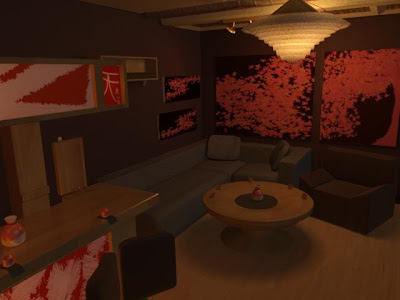
Pre photoshop vs. final picture


here you can see my final picture and how it looked before
i used photoshop.

onsdag 4. november 2009

A new day and another render


Today i have mostly worked with lights.
I have removed the spotlights in the bar, because i
felt they ruined a bit of the atmosphere in the room.
I have put in some lights to highlight the art in the bar
i have cooled down the color in the main light from the
lounge lamp and i have put some weak spotlights on the
paintings to give them back the heat they lost due to the
cooling of the lounge lamps light.
I have also created a new texture for the cups and sake jars
to compliment the art in the bar.
I have done some modeling as well, like the light-switch
next to the bar and the spots hanging from the ceiling.

tirsdag 3. november 2009

New render


A new render. I have fixed some shadow problems and added some lights and new elements to the scene.

mandag 2. november 2009

Oblig 1, part 3


I am now finished with the modeling of all the major parts of my scene and I have moved on to lighting and shadow. Since last time i have raised and modeled the roof, made a new tableand some flasks, cups/glasses and a ceiling lamp. I have also put in some paintings that i made in photoshop.
I will use the rest of the week to set up proper materials and lights.

onsdag 28. oktober 2009

oblig1, part 2


This week i have been modeling the major elements of the scene like the bar, chair and sofa.
i have also enlarged my original scene because of general lack of space.
I am now moving on to modeling smaller elements such as bottles, pillows and the like. I will hopefully be able to move on to materials and lightning at the end of next week.

fredag 23. oktober 2009

Oblig 1 Part 1


I have now started on the first part of my assingment
called archtectual visualisation and i've started with the planning of the layout and design of the room i'm creating.

Here i have put in some images of my "idea-report"
and some pictures of furnitures i am thinking of using.


torsdag 15. oktober 2009


We worked with mix maps and the use of photoshop in 3Dsmax today, here i created a crater using 2 different materials in a mix map, to create a sense of impact at the centre of the crater. I used photoshop to create an oppacitymap that i laid on top of the mixmap to set a path for the mix.